

QuickBooks vs Sage 50: Which Accounting and Payroll Software Should You Learn in Canada?
Short answer: learn both if you can. QuickBooks Online is cloud-based accounting software you use in a browser or mobile app. Sage 50 is desktop accounting software with cloud connectivity. Both handle Canadian payroll tasks such as source deductions, T4 slips and Records of Employment (ROEs). The accounting principles behind them are the same, so whichever you learn first makes the second easier.
If you are comparing accounting and payroll courses, the software list is one of the most practical things to check. Here is how the two programs differ, and how to decide which to learn first.
QuickBooks vs Sage 50?
The main difference is where the software runs. Intuit describes QuickBooks Online as software that lets you manage business finances “on the web or through a mobile app.” Sage describes Sage 50 as “desktop accounting software with cloud connectivity,” meaning it is installed on a computer, with options for remote access.
| Feature | QuickBooks Online (Canada) | Sage 50 (Canada) |
|---|---|---|
| Where it runs | Cloud: web browser and mobile app | Desktop-installed, with cloud connectivity |
| Plans named on the vendor site | EasyStart, Plus, Advanced (among others) | Pro, Premium, Quantum |
| Canadian payroll | QuickBooks Payroll: CPP, EI and federal income tax deductions; T4s and ROEs | Payroll with a service plan that includes payroll; ROE, T4, T4A and RL-1 forms |
| Inventory and projects | Check current plan features | Inventory on all tiers; project and job tracking on listed tiers |
| Bank connections | Automatic bank transaction sync | Check current Sage features |
Source: Intuit QuickBooks Canada and Sage 50 Canada product pages, checked October 5, 2026. Features and plans can change.
How does payroll work in each program?
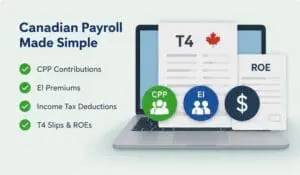
Both programs handle the same Canadian payroll obligations. They differ in how payroll is set up.
The Canada Revenue Agency (CRA) says employers must calculate deductions and contributions on employee pay, remit them, and report them. In practice that means:
- Canada Pension Plan (CPP) contributions
- Employment Insurance (EI) premiums
- Income tax deductions
- Information returns, such as T4 slips and summaries
According to Intuit, QuickBooks Payroll can automate CPP, EI and federal income tax deductions and prepare and file T4s and ROEs. According to Sage, Sage 50 payroll needs a service plan that includes payroll processing, and that plan covers forms such as the ROE, T4, T4A and RL-1.
The key point for learners: the software does the arithmetic, but you still need to know the rules. Payroll staff check employee setup, pay periods, deductions and remittance deadlines. Software can’t fix a wrong input. That is why payroll legislation is worth studying alongside the software. In Edison College Canada’s Accounting & Payroll Administration diploma, the Payroll Fundamentals 1 and 2 and Payroll Compliance Legislation courses cover these rules alongside the software courses.
Which software should you learn first?
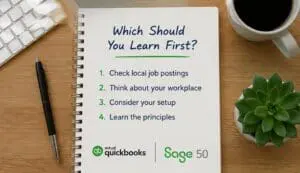
Start with the software that matches the jobs you want, then add the other one. A quick way to decide:
- Read 10–15 local job postings for bookkeeping, accounts payable or receivable, or payroll roles in your area. Note which software they name.
- Think about the workplace. A small business that works remotely may prefer cloud tools. An office that keeps its files on local computers may run desktop software.
- Consider your own setup. QuickBooks Online runs in a browser. Sage 50 is installed on a computer, so check its system requirements first.
- Learn the principles, not just the buttons. Journal entries, bank reconciliation, accounts payable and receivable, and payroll deductions work the same way in both programs.
If you can’t tell which one employers near you prefer, learning both is the safest choice. Each one is easier to learn once you know the other. Edison’s Accounting & Payroll Administration diploma includes both a QuickBooks course and a Sage 50 course, so you don’t have to pick one before you start.
What should you look for in accounting and payroll courses?
The best accounting and payroll courses teach three things together: accounting principles, Canadian payroll rules and the software used to apply them. Use this checklist to compare programs. The right-hand column shows how Edison College Canada’s Accounting & Payroll Administration diploma covers each point.
| What to check | Why it matters | Edison’s Accounting & Payroll Administration diploma |
|---|---|---|
| Software taught | Job postings often name specific software | QuickBooks, Sage 50 and Microsoft Office courses |
| Canadian payroll content | CPP, EI, income tax, T4s and ROEs follow Canadian rules | Payroll Fundamentals 1 and 2; Payroll Compliance Legislation |
| Accounting foundations | Software records entries but doesn’t explain them | Financial Accounting; Managerial Accounting; Taxation; Financial Planning |
| Credential and length | A short software course and a diploma differ in depth | Diploma, 55 weeks / 1,100 hours |
| Delivery | The format has to fit your schedule and location | In class in Victoria, BC, or online |
| Professional pathway | Some payroll courses line up with a designation path | Payroll courses follow the National Payroll Institute’s PCP certification path (the diploma does not award PCP) |
| Regulation | In BC, career training at private institutions is regulated by PTIRU | Edison College Canada is regulated by PTIRU |
Short course or diploma? A short software course can teach one program’s features quickly. That may be enough if you already work in bookkeeping or payroll. If you are starting out, a diploma covers accounting, payroll rules and more than one software package in a single program.
If you want all of these in one program, Edison College Canada’s Accounting & Payroll Administration diploma is one option to consider. The next section has the full program details.
What does Edison College’s Accounting and Payroll Administration diploma cover?
Edison College Canada’s Accounting & Payroll Administration diploma teaches accounting, Canadian payroll and the software used for both, in one program. Edison College Canada is regulated by British Columbia’s Private Training Institutions Regulatory Unit (PTIRU).
| Detail | Accounting & Payroll Administration diploma |
|---|---|
| Credential | Diploma |
| Length | 55 weeks / 1,100 hours |
| Delivery | In class in Victoria, BC, or online |
| Software courses | QuickBooks; Sage 50; Microsoft Office (Word, Excel, PowerPoint, Outlook) |
| Payroll courses | Payroll Fundamentals 1 and 2; Payroll Compliance Legislation |
| Accounting and business courses | Financial Accounting; Managerial Accounting; Financial Planning; Taxation; Computer Fundamentals |
| Practical training | Hands-on work in industry-standard software, rather than a practicum |
| Admission | High school diploma or equivalent, or mature student status (19 or older before the program starts), plus English proficiency |
Source: Edison program page, checked October 5, 2026. See the program page for current admission requirements, tuition and start dates.
The payroll courses follow the National Payroll Institute’s Payroll Compliance Professional (PCP) certification path. The diploma does not award the PCP designation; earning it means meeting the National Payroll Institute’s own requirements.
The diploma is designed to prepare students for roles such as bookkeeper, accounting technician, accounts payable or receivable clerk, and payroll administrator. Employment depends on the employer, the labour market, prior experience and each graduate’s qualifications. If payroll is your main interest, read our guide on how to become a payroll administrator.
The diploma may suit you if you:
- want to learn both QuickBooks and Sage 50, not just one
- are interested in payroll as well as bookkeeping
- need to study online, or prefer a classroom in Victoria
Will AI make accounting software skills less important?
Automation is changing routine data entry, but someone still has to set up, review and explain the numbers. AI tools are being added to accounting software. That makes it more important to understand what the software is doing and to spot when something looks wrong. For a closer look, see our article on whether AI will replace bookkeepers and payroll administrators.
Next step
If you want to learn QuickBooks, Sage 50 and Canadian payroll rules together, explore the Accounting & Payroll Administration diploma. The program page lists the courses, start dates, tuition and admission requirements.
Frequently asked questions
Is QuickBooks or Sage 50 better for Canadian payroll? Both support Canadian payroll tasks, including source deductions, T4s and ROEs. QuickBooks Payroll works with QuickBooks Online. Sage 50 needs a service plan that includes payroll. Neither one replaces knowing CRA payroll rules.
Is QuickBooks Online the same as QuickBooks Desktop? No. QuickBooks Online runs in a web browser and mobile app. This article compares QuickBooks Online with Sage 50 because Intuit’s Canadian site leads with QuickBooks Online.
Is Sage 50 cloud-based? Sage describes Sage 50 as desktop accounting software with cloud connectivity. It is installed on a computer and has options for remote access.
Do I need an accounting course to learn QuickBooks or Sage 50? Not always. Vendor tutorials can teach the features. A structured accounting and payroll course also teaches the accounting and payroll rules behind each entry, which the software cannot do for you.
Which accounting and payroll software do employers in Canada use? It varies by employer, industry and region. The most reliable way to find out is to review current job postings for the roles you want in your area.
Does Edison College teach QuickBooks and Sage 50? Yes. Edison College Canada’s Accounting & Payroll Administration diploma includes a QuickBooks course and a Sage 50 course, along with payroll, accounting and Microsoft Office courses. You can take it in class in Victoria, BC, or online.